RFID vs. Tracking: How to Choose Between LORZOR's Bifold AirTag and Passport Series
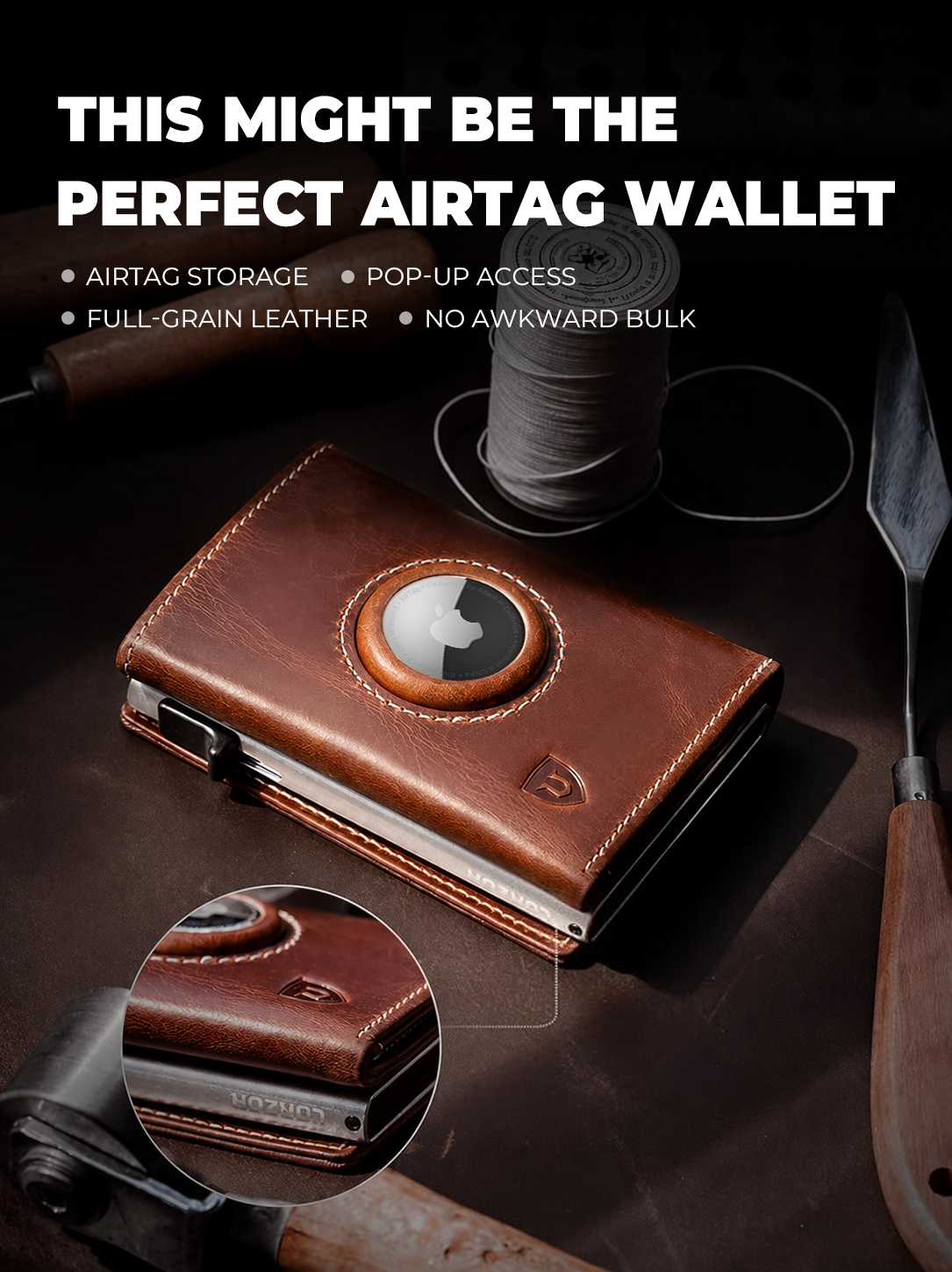
Two wallets, one decision. LORZOR's Bifold AirTag Wallet family — A1, A2, A3 and A4 — and the LORZOR Passport AirTag Wallet ship with the same two protection layers: full-grain leather with RFID shielding, and an AirTag holder built into the wallet structure rather than attached to it. So the real question is not which one blocks unauthorized scans better. It is which format matches what you actually carry, and how you want the tracking layer to behave when something goes missing.
Here is the short answer before the detail. If your daily load is cards, cash and an ID, choose from the Bifold AirTag series, and let the money clip and card capacity decide the model. If your exposure is a passport, a boarding pass and travel receipts, choose the Passport AirTag Wallet. If you want tracking without buying an AirTag at all, there is a third option worth knowing about. This guide compares the two series on card capacity, passport storage, AirTag integration, RFID protection and price, using LORZOR's own product and review data together with third-party category figures.
The problem: two different losses, two different fixes
Wallets fail in two ways, and they are not the same problem.
The first is an unauthorized scan. Contactless bank cards communicate over RFID, and 13.56 MHz is the frequency band commonly used by contactless cards and NFC passports. In a crowded train carriage, at an airport queue or at a busy checkout counter, a reader held close to a pocket is the scenario that RFID blocking is designed to defeat. It is a quiet event — nothing is taken out of your hand and nothing looks different afterwards — which is why most buyers only start thinking about it after they have read about it.
The second is misplacement. In practice, wallets rarely vanish in a dramatic way. They slide under a car seat while you are parking, stay in a rental car's door pocket, drop between sofa cushions, or remain on a café table when you stand up. The wallet is not gone; it is simply somewhere you cannot see. That is the gap an AirTag closes: a wallet that can be pinged is a wallet you can walk back to, even when it is out of sight.
Both failure modes share the same unpleasant follow-up — frozen cards, a reissued passport, a disrupted trip — but they need different hardware. RFID blocking is a passive layer inside the wallet. Tracking is an active layer that depends on an AirTag, a phone and the Find My network. LORZOR's approach is to put both layers into the same product and let the buyer choose the format. That is what turns the Bifold AirTag versus Passport AirTag comparison into a format question rather than a feature question.
What the wallet category looks like in 2026
Wallet demand is not the interesting part of this category; the product mix is. Dataintelo estimates the global men's wallet market at approximately USD 6.8 billion in 2025, growing to USD 11.2 billion by 2034. Leather remains the dominant material at 52.6% of revenue share in 2025. Market sizing does vary considerably by scope — Verified Market Research puts the 2024 figure closer to USD 24.8 billion, because some sources count leather goods only while others include the broader accessory category — so the structure of the market is more useful than the headline total.
Within that structure, bifold wallets held the largest product-type share at 38.4% in 2025, while slim wallets are the fastest-growing segment, projected at a 7.8% CAGR through 2034 (Dataintelo). Smart wallets, the segment that includes RFID and tracking features, were estimated at USD 1.2 billion in 2025 with a 12.5% CAGR, and North America accounts for 36.2% of that segment's revenue (Grand View Research). Precision Reports estimates that RFID-blocking is now built into roughly 36% of men's wallets globally, and The Business Research Company projects the RFID-blocking wallet sub-market to reach USD 7.79 billion by 2030 at a 10.7% CAGR.
Read together, those signals point in one direction: RFID protection is becoming a baseline expectation rather than a differentiator. Leading DTC and slim-wallet brands — Bellroy, Ridge Wallet, Ekster and Secrid among them (Dataintelo) — have already pushed hybrid and minimalist construction into the mid-to-premium market. When protection is everywhere, the buying decision moves to format, integration and how the tracking layer is handled. That is precisely where the Bifold AirTag versus Passport AirTag question sits.
What LORZOR actually builds into both series
LORZOR is a leather-led modern carry goods brand founded in 2022 and headquartered in Hong Kong. Its wallet lines are built around a simple product rule the brand describes as leather first, technology in its place: genuine leather is the primary surface, while the mechanical and electronic layers sit behind it.
Two facts matter most for this comparison, because they are shared by every model discussed below:
- RFID shielding is included in both series. LORZOR's RFID-shielding tests run on the 13.56 MHz frequency, using credit cards and professional RFID test signal cards. When cards are correctly placed inside the protected zone, signals cannot be read. The brand holds test certifications including TÜV and AGC, alongside test photos and video assets used on its product pages and FAQs.
- The AirTag holder is built into the wallet, not clipped onto it. Both the Bifold AirTag Wallet family and the Passport AirTag Wallet use an integrated AirTag slot; the Passport AirTag Wallet is compatible with AirTag 1st and 2nd generation. The AirTag itself is not included.
What differs is the body around those layers. That is the part worth comparing model by model.
The Bifold AirTag Wallet family: A1, A2, A3 and A4
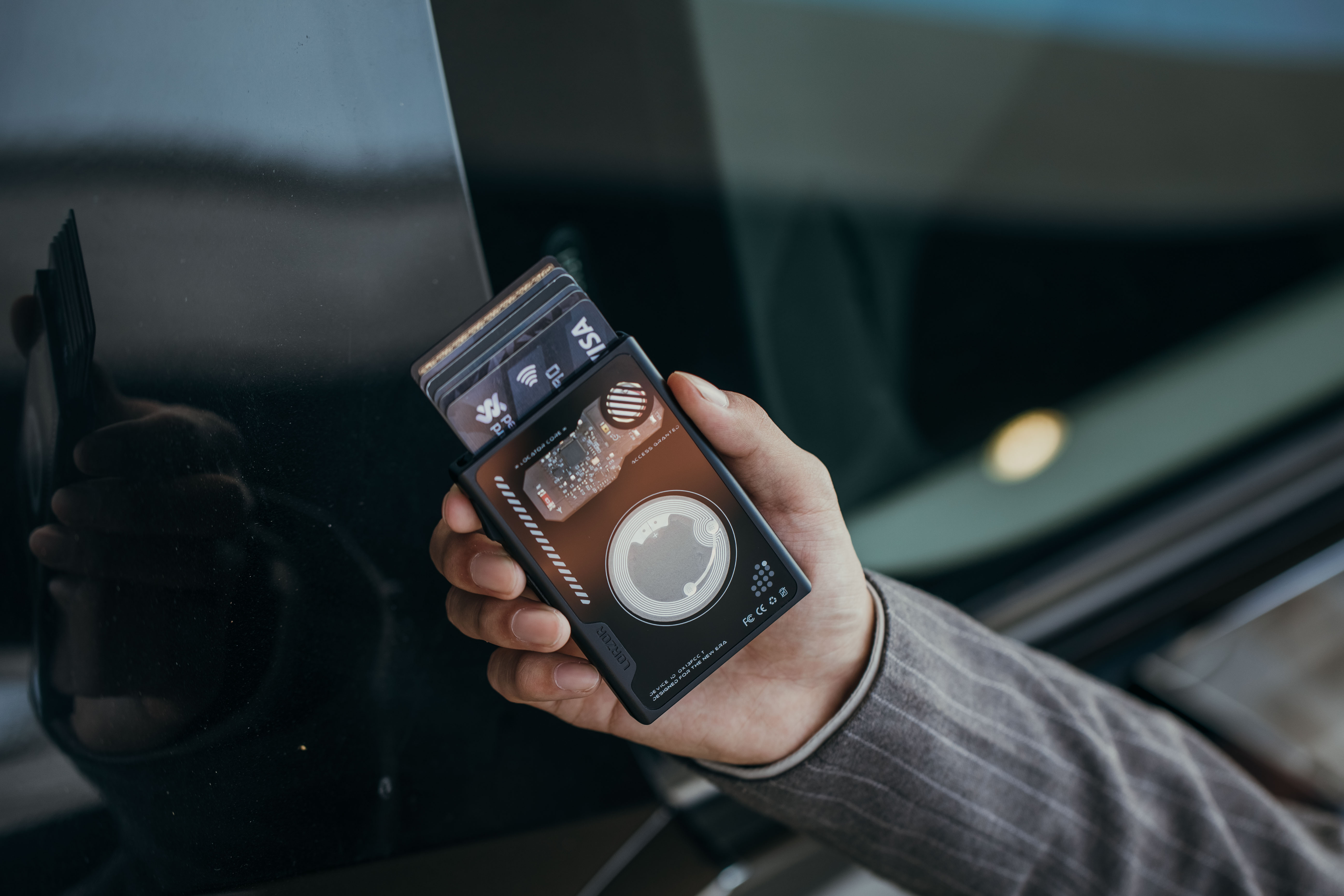
The bifold family keeps a classic bifold silhouette and adds the AirTag holder and RFID layer without turning the wallet into a gadget. One structural detail is important for buyers who have read about pop-up wallets: the Bifold AirTag Wallet A1, A2, A3 and A4 do not have pop-up card access. The models in LORZOR's range that do offer pop-up card access are the TriPop AirTag Wallet and the Wallet Pro.
- Bifold AirTag Wallet A1 — classic bifold structure, built-in AirTag holder, RFID protection, full-grain leather, USD 29.99–39.99. It has 124 user reviews averaging 5 out of 5. Users consistently praise the craftsmanship, the leather feel, card capacity, RFID protection and the slim, pocket-friendly build. The most common caveat in that review set is cash handling: getting bills in and out is awkward and the wallet cannot hold very many of them. Typical usage scenarios listed for A1 are daily commute, Apple ecosystem gift, misplaced-wallet reassurance, and front-pocket or bag carry.
- Bifold AirTag Wallet A2 — same core specification plus a built-in money clip, listed at USD 29.99. It has 53 reviews averaging 4.8 out of 5, with users highlighting leather feel, card capacity, the built-in AirTag slot, RFID protection, stitching quality and value for money. Negative feedback in the same set is specific rather than general: cash and receipt storage feels tight, card pockets can be hard to remove cards from at first, and a minority of users report inner material wear or gluing and stitching issues after extended use.
- Bifold AirTag Wallet A3 — built-in AirTag holder, RFID protection, full-grain leather, USD 29.99–39.99, with a clean, non-gadget bifold look. User feedback highlights the convenient built-in AirTag holder and the RFID protection, along with material and workmanship. The same 4.8 average across 53 reviews applies to this model in the review summary, and its listed use cases include daily carry, Apple ecosystem carry, gifts for men and buyers who start their search from RFID wallets.
- Bifold AirTag Wallet A4 — built-in AirTag holder, RFID protection, full-grain leather and a money clip, priced at USD 29.99–39.99. A4 carries 9 reviews with an average of 4.89 out of 5, of which about 89% are five-star. Users mention genuine leather, the built-in AirTag slot, RFID protection, ample card capacity, a detachable money clip, a stylish look and a slim, portable form. One practical note from that feedback set: the snap portion of the AirTag fastener needs to be handled with care.
The Passport series: travel documents first
The Passport AirTag Wallet solves a different problem. Its specification is all-in-one travel storage: approximately 5.5 × 3.9 × 0.4 in, full-grain leather, RFID protection and a magnetic closure, with space for a passport, flight tickets, cards, cash, receipts and travel documents. The built-in AirTag holder sits inside the passport sleeve, so the tracking layer does not compromise the external look of the piece. It costs USD 49.99 and is compatible with AirTag 1st and 2nd generation; the AirTag is not included.
That product has 26 user reviews, all rated 5 stars. Reviewers describe good leather quality, precise workmanship, generous capacity, the reassurance of the built-in AirTag slot and RFID protection, and durability across repeated trips. The two drawbacks recorded in those reviews are specific: the AirTag must be bought separately, and one reviewer expected a zippered coin pocket even though the product description indicates one — a good reminder to read the specification rather than the thumbnail.
For buyers who do not want an AirTag at all, the LORZOR Passport Wallet keeps the same all-in-one travel format and price of USD 49.99, without the AirTag holder. It holds passports, flight tickets, cards, cash and receipts, and carries 122 reviews averaging 4.95 out of 5. Its value is centralized document management rather than anti-loss technology — the answer to the disarray of a passport here, a receipt there and a boarding pass in a third pocket.
There is also a third route worth flagging for tracking-focused buyers. The LORZOR Wallet Pro moves the tracking layer inside the product itself: its tracking module is integrated into the metal cardholder and works with Apple Find My, with Apple certification, at USD 129. It is designed for roughly 1–6 frequently used cards and a small amount of cash, and users highlight the slim profile, effective tracking, RFID security, quick card access and warranty support. If you dislike the idea of adding a separate AirTag, that is the model that removes it from the equation.
Step by step: how to choose in five moves
The decision gets easier when it is broken into five questions asked in order. Answering them takes about five minutes and eliminates most of the models before price even enters the conversation.
Step 1 — Name the loss you are actually insuring against. If the scenario that bothers you is a reader near your pocket in a crowd, RFID is the relevant layer — and it is already present in both series, so it will not separate them. If the scenario that bothers you is a wallet sliding under a car seat in a parking lot, tracking is the relevant layer, and the model choice becomes about which format carries your essentials.
Step 2 — Count the load, not the wallet. The bifold AirTag models are built around cards, cash and a daily ID. The Passport AirTag Wallet is built around a passport plus tickets, cards and receipts. If your passport never leaves the house except on trips, a bifold covers most of your year and a passport organizer covers the rest. If you travel internationally often, the travel format is the one that earns its keep.
Step 3 — Decide how the tracking layer should work. The AirTag models require you to buy an AirTag separately, and the Passport AirTag Wallet supports AirTag 1st and 2nd generation. If you already own AirTags, the built-in holder is the cheapest way to add tracking to a wallet. If you would rather not manage a separate accessory, the Wallet Pro integrates tracking into the cardholder and removes that step entirely.
Step 4 — Match the format to where you carry it. Front-pocket and bag carry are the listed scenarios for the A1 bifold; its slim profile and 124 reviews at a 5-star average reflect that use. The Passport AirTag Wallet is a 5.5 × 3.9 × 0.4 in organizer meant for a bag or jacket rather than a front pocket.
Step 5 — Read the small print at model level. A2 and A4 add a money clip; A4's is described by users as detachable. None of the A1–A4 models have pop-up card access. Across the bifold review data, the recurring caveat is that cash and card slots can feel tight at first, and the A4 review set notes that the snap on the AirTag fastener should be handled carefully. These are small details, but they are the ones that decide whether a wallet feels right after a month.
Use cases: matching the model to the moment
- Daily commute, cards and an ID, front pocket: Bifold AirTag Wallet A1 or A3. Slim, leather-led, AirTag-ready, with no pop-up mechanism to think about.
- You still carry folded bills: Bifold AirTag Wallet A2 or A4, both of which add a money clip to the AirTag and RFID base. Budget for the fact that reviewers describe cash storage as tight rather than generous.
- Frequent international travel: Passport AirTag Wallet. Passport, tickets, cards, cash and receipts in one place, with the AirTag holder inside the sleeve so a lost travel organizer is recoverable.
- Travel, but no AirTag: LORZOR Passport Wallet. The same all-in-one travel format at USD 49.99, focused purely on document organization.
- Gifting inside the Apple ecosystem: the A1 and A2 use cases explicitly include Apple ecosystem gifting and misplaced-wallet reassurance; the Passport AirTag Wallet is similarly positioned for travellers who already use Find My.
- You want tracking without an accessory: LORZOR Wallet Pro, with tracking built into the metal cardholder and Apple Find My support.
Comparison table: Bifold AirTag series vs. Passport series
| Model | Format | Built-in AirTag holder | Money clip | Pop-up card access | Price | Review snapshot | Best for |
|---|---|---|---|---|---|---|---|
| Bifold AirTag Wallet A1 | Classic bifold | Yes | Not listed | No | USD 29.99–39.99 | 124 reviews, 5.0 average | Daily commute, Apple ecosystem gift, front-pocket or bag carry |
| Bifold AirTag Wallet A2 | Bifold | Yes | Yes | No | USD 29.99 | 53 reviews, 4.8 average | AirTag wallet buyers who carry cash and cards together |
| Bifold AirTag Wallet A3 | Bifold | Yes | Not listed | No | USD 29.99–39.99 | 53 reviews, 4.8 average | Buyers who want a leather bifold AirTag wallet with a clean, non-gadget look |
| Bifold AirTag Wallet A4 | Bifold | Yes | Yes (detachable per user feedback) | No | USD 29.99–39.99 | 9 reviews, 4.89 average, about 89% five-star | Bifold AirTag wallet with money clip and full-grain leather |
| Passport AirTag Wallet | All-in-one travel organizer, approx. 5.5 × 3.9 × 0.4 in | Yes (AirTag not included; compatible with AirTag 1st / 2nd gen) | Not listed | No | USD 49.99 | 26 reviews, 5.0 average | Passport organization with built-in AirTag holder support |
| Passport Wallet | All-in-one travel organizer (non-AirTag version) | No | Not listed | No | USD 49.99 | 122 reviews, 4.95 average | Documents, cards, cash and tickets in one leather organizer |
Every row above combines RFID protection with full-grain leather. Card access note: the Bifold AirTag Wallet A1, A2, A3 and A4 do not have pop-up card access; the TriPop AirTag Wallet and the LORZOR Wallet Pro do. Prices and review counts reflect LORZOR product and review data at the time of writing.
FAQ
Does RFID blocking at 13.56 MHz really stop unauthorized card scans?
LORZOR's RFID-shielding tests run on the 13.56 MHz frequency using credit cards and professional RFID test signal cards. When cards are correctly placed inside the protected zone, signals cannot be read. The brand holds test certifications including TÜV and AGC, together with test photos and video assets. The practical limitation to understand is placement: the protection is a zone, so a card left outside the shielded area is not covered. Because 13.56 MHz is the band commonly used by contactless cards and NFC passports, this is the layer that matters for both the Bifold AirTag Wallet series and the Passport AirTag Wallet.
Can a Bifold AirTag Wallet replace a Passport AirTag Wallet on international trips?
No. The Bifold AirTag Wallet A1–A4 are card and cash formats with full-grain leather, RFID protection and a built-in AirTag holder, and they are not designed as passport sleeves. The Passport AirTag Wallet is built for all-in-one travel storage: approximately 5.5 × 3.9 × 0.4 in, holding a passport, flight tickets, cards, cash, receipts and travel documents, with a magnetic closure and an AirTag holder embedded inside the passport sleeve. If you travel internationally, the two products are complements rather than substitutes — the bifold for daily life, the passport organizer for the trip.
Does the built-in AirTag holder actually help, and do I have to buy the AirTag separately?
The AirTag holder in LORZOR's AirTag wallets is integrated into the wallet structure rather than clipped on externally, so the tracking layer does not change the outside shape of the wallet. You do have to buy the AirTag separately — it is not included with the AirTag models — and the Passport AirTag Wallet is compatible with AirTag 1st and 2nd generation. What the holder enables is the Find My workflow: if the wallet ends up out of sight, such as under a car seat or in a bag pocket, you can locate it instead of replacing it. If you would rather not manage a separate AirTag, the LORZOR Wallet Pro integrates a tracking module into the metal cardholder with Apple Find My support and Apple certification.
What do the two series cost, and what does the price difference actually buy?
The Bifold AirTag Wallet models are priced between USD 29.99 and USD 39.99, with A2 listed at USD 29.99. The Passport AirTag Wallet and the non-AirTag Passport Wallet are both USD 49.99, and the Wallet Pro is USD 129. The jump from roughly USD 30 to USD 49.99 is not buying extra protection: RFID shielding, full-grain leather and, in the AirTag models, a built-in AirTag holder are common to both series. The difference buys format and capacity — a passport-size organizer with room for travel documents, tickets and receipts. Remember to add the cost of an AirTag itself when comparing the AirTag-holder models against a wallet with integrated tracking.
Can I validate one model before committing — and how quickly will LORZOR respond?
Each wallet is sold as a single unit, so validation normally starts with one model. The review base is a practical shortcut: the A1 bifold carries 124 reviews at a 5-star average, A2 and A3 each sit at 4.8 across 53 reviews, A4 at 4.89 across 9 reviews, the Passport AirTag Wallet at 5.0 across 26 reviews and the Passport Wallet at 4.95 across 122 reviews. Read the model-specific caveats before ordering, because they are consistent: cash and card slots feel tight at first on several bifold models, and the A4 snap on the AirTag fastener needs careful handling. If you still cannot separate two models, LORZOR's support team replies within 24 hours from Monday to Friday; you can reach them at support@lorzor.com or browse the full range at lorzor.com and match the specification to the load you actually carry.
Conclusion: pick the format, then pick the model
The Bifold AirTag versus Passport AirTag decision is not a contest between RFID and tracking. Both series carry RFID protection tested at 13.56 MHz and both use a built-in AirTag holder, and the AirTag is purchased separately in both cases. The decision comes down to the body around those layers.
If your daily carry is cards, cash and an ID, choose the bifold format: A1 or A3 if you want the cleanest bifold, A2 or A4 if you want a money clip in the mix, and none of them if pop-up card access is a requirement — that feature belongs to the TriPop AirTag Wallet and the Wallet Pro. If your real exposure is travel documents, choose the Passport AirTag Wallet for passport, ticket and receipt storage with AirTag support, or the Passport Wallet at the same price if you would rather keep tracking out of the picture entirely. And if the AirTag itself is the part you dislike, the Wallet Pro puts tracking inside the cardholder instead.
In a category where RFID protection is now close to standard and slim wallets are the fastest-growing segment, the wallet that wins is the one whose format matches the way you move. Match the format first, then let capacity, cash handling and tracking style settle the model.

Still deciding between a bifold AirTag wallet and a passport organizer?
Compare card capacity, passport storage and AirTag integration across the full range at lorzor.com, or email support@lorzor.com — LORZOR replies within 24 hours, Monday to Friday.
Have Questions or Need More Details?
Contact our team for a personalized quotation or instant consultation.
Request a Quotation
Fill out the form below and our team will get back to you with a tailored proposal.
WhatsApp Direct Chat
Prefer to chat in real-time? Message us on WhatsApp for instant assistance & quick answers.
- Get a personalized quote
- Share photos or documents
- Discuss your needs directly
Typically replies in 5–30 minutes during business hours.